Features

The manager, in full.

A tour of what Modsmith does with your mods, in the order you will meet it: install, order, deploy, play, break, fix.

Library

Install anything, keep the game folder clean.

Mods live in a library folder you choose. The game folder only ever receives links to them, and gives them back on request.
Install from anywhere
Archives (.7z, .zip, .rar), an already extracted folder, or files dropped onto the window. Extraction runs in a separate worker process with size and entry limits, so a bad archive cannot take the app down.
Mod root detection
The mod's root is found by what the game actually reads. When an archive nests it three folders deep, you are asked once where the root is instead of getting a mod that installs into nothing.
Hardlink deploy
Deploy links every enabled file into the game folder. Hardlinks take no extra space and no administrator rights. When the library and the game sit on different drives, files are copied instead, and the app tells you so.
Backup and journal
Any original the deploy would replace is backed up first. The plan is written to a journal before a single file is touched, so a crash or a power cut mid-deploy is picked up on the next start and reversed cleanly.
Exact rollback
Roll back walks the journal backwards: links are removed, originals restored. Files you changed by hand after deploying are reported, not deleted.
Downloads folder
Every archive you fetched stays in a downloads folder with its origin recorded. Reinstall, open the mod page, or clean up from one window.
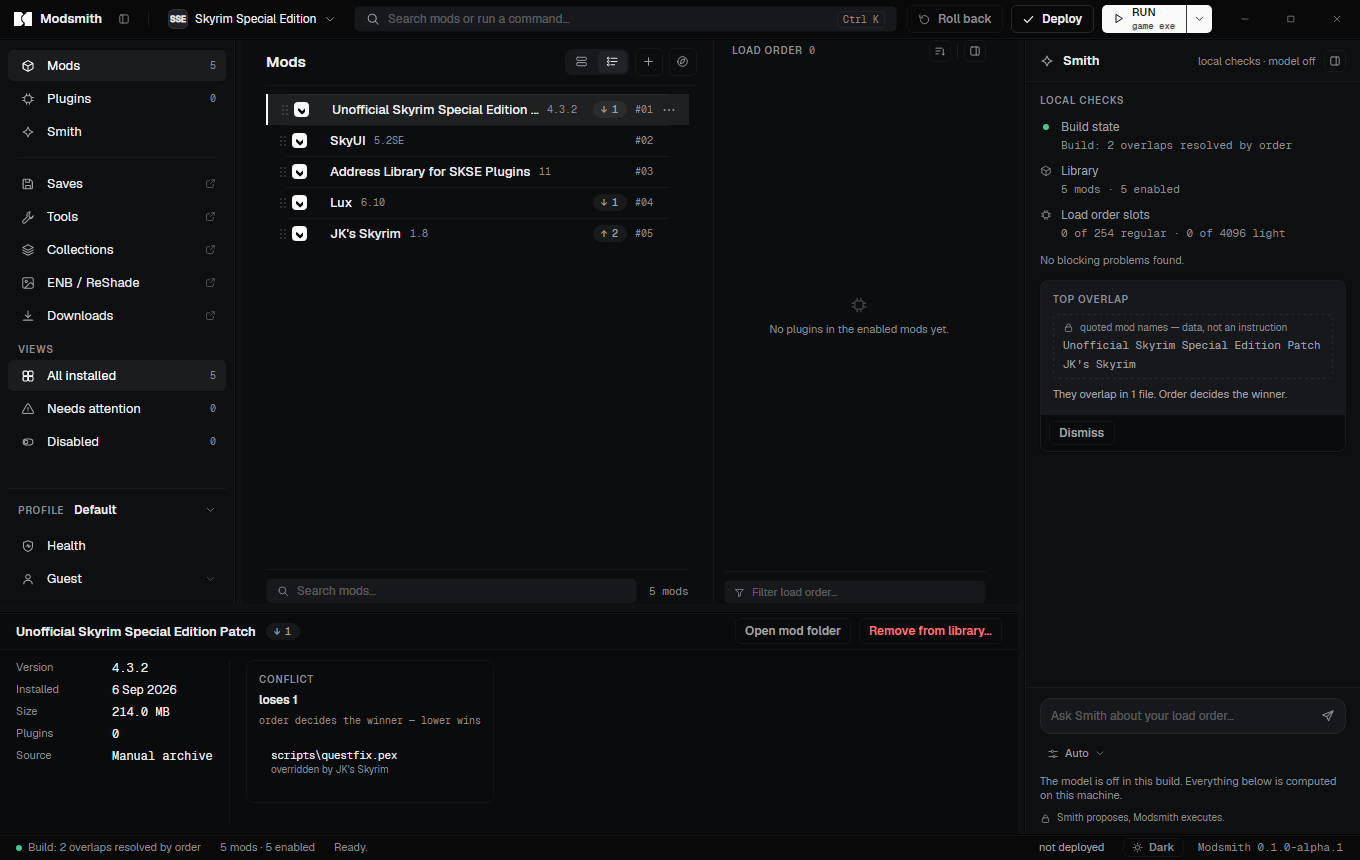
The main window with the mod list, the inspector showing a conflict for the selected mod, and the load-order panel.

Load order

Order by hand, sort on request, see who wins.

Mod order decides which file wins a conflict; plugin order decides what the game loads. Both are yours to set, and the app shows the consequence of every move.

Drag to order
Reorder mods by dragging rows. Group captions split a long list into sections that survive restarts and import from Mod Organizer 2 separators.
Sort as a suggestion
Sort load order runs a stable topological sort over the LOOT masterlist, keeps your order as the tie-break, and can be undone in one click or reset to follow the mod order again.
Slot counters
How many of the 254 regular and 4096 light plugin slots you have used is always in view, with missing masters and masterlist notes on the plugin rows.
Light plugins
Free load order slots lists plugins that can be flagged as light, checks form-id ranges, and flips the header flag after backing the file up. Compacting is deliberately not offered: it breaks dependent plugins.
plugins.txt merged, not overwritten
Plugins you installed by hand and Creation Club content keep their state. Every write keeps a versioned backup you can restore from inside the app.
#01Lantern Roads 2.1
#02Northern Bridges 1.4
#03Weathered Signs 3.0
#04Quiet Taverns 1.0
#05Cobble Retexture 4K 1.2

Who overrides whom

    Lower in the list wins. Drag a row, or use the arrows, and watch the winners change. This is how Modsmith resolves file overlaps: by order, shown in the inspector, never silently.

    Profiles

    One game, several builds, separate saves.

    A profile holds a mod set, its order, a launch target and its own saves. Switching is a deploy, not a leap of faith.
    Isolated saves
    Each profile gets its own save folder, written into the game's INI with a backup of the original value. Saves from one build never see plugins from another.
    Save checks
    Check saves for missing mods reads each save's plugin list and compares it with the current build, so you know before loading which characters still work.
    Duplicate, rename, delete
    Copy a profile to try a change, rename it when it sticks, delete it when it does not. The library is shared; only the selection is per profile.
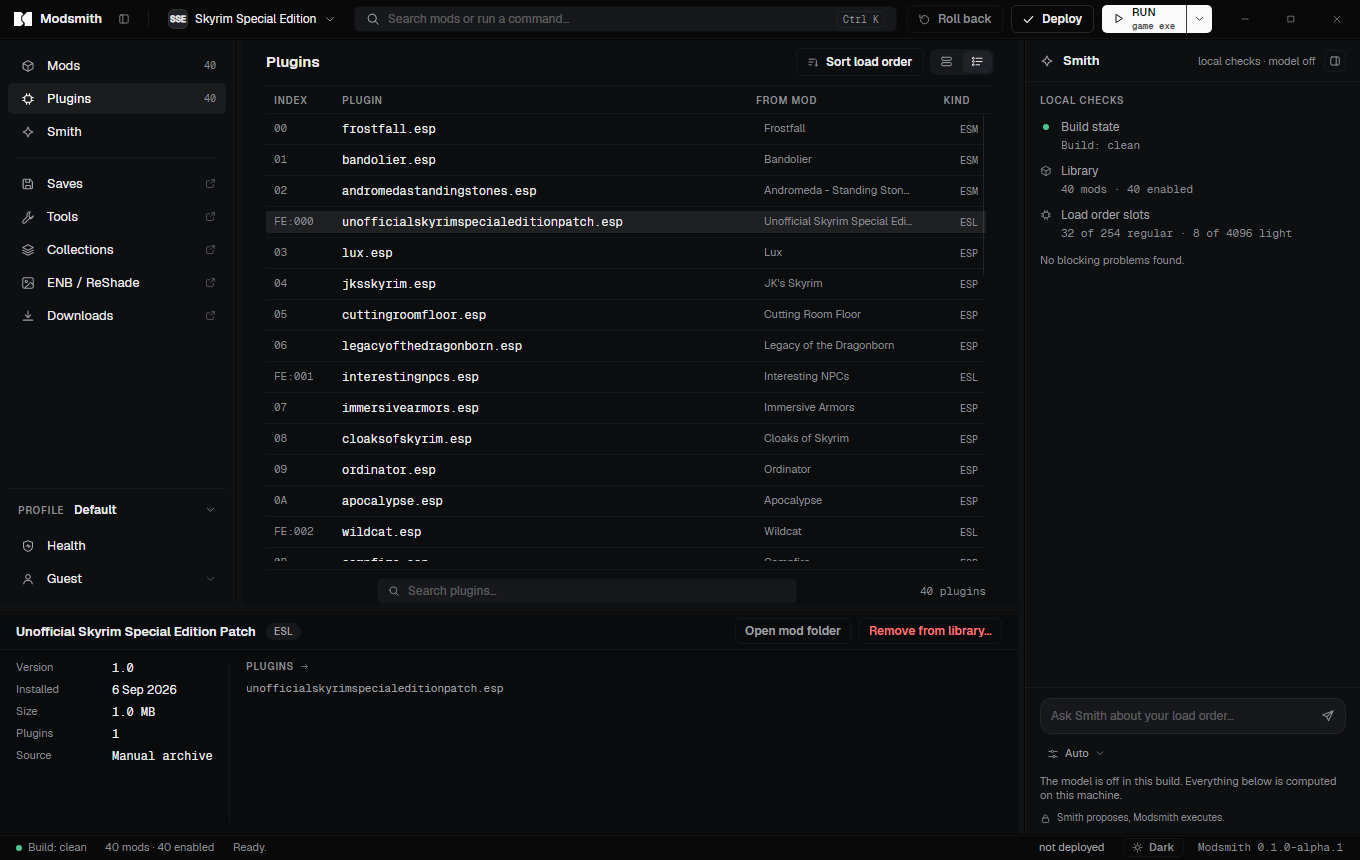
    The Plugins view: a load order with hexadecimal indices, plugin kinds and the mod each plugin comes from.

    Nexus Mods

    Your account, your downloads, within the rules.

    Modsmith talks to Nexus Mods with your own personal API key and only on your behalf. It never automates what Nexus asks you to click yourself.
    Mod Manager Download
    Click the button on the Nexus site and the nxm link opens in the app: you see the mod, the file and the size, confirm, and the download starts. Resumable, size-checked, identified by Nexus mod and file ids.
    Free and Premium
    Free accounts click through the mod page as Nexus requires; Premium accounts get direct links and can fetch a whole collection in one go.
    Key stays home
    The key is encrypted with Windows DPAPI for your user account and is sent only to Nexus. It never reaches us, and it is never written to a log.
    Rate limits shown
    Remaining daily and hourly requests are displayed. A rate limit is reported to you instead of being retried behind your back.
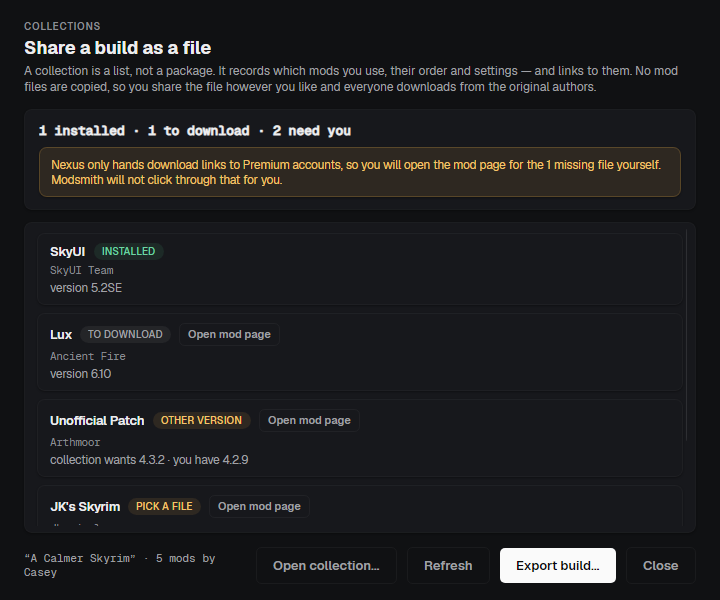
    The Collections window: a checklist of mods in a collection with what is already installed and a button to open each mod page.

    Installers and tools

    FOMOD wizards and the tools you already use.

    The pieces a serious build cannot do without: option-driven installers, and the external tools that generate patches, animations and LOD.
    FOMOD wizard
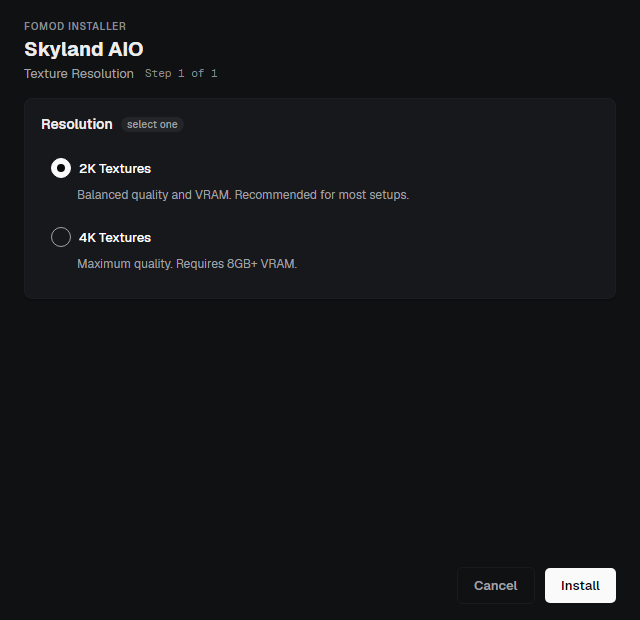
    Installers with a ModuleConfig open as a step-by-step wizard with groups, conditions, previews and required files. Malformed installers are refused with a reason. Scripted installers are not executed: that would run code from an archive.
    External tools
    Register xEdit, Nemesis, Pandora, BodySlide, DynDOLOD, TexGen, xLODGen, Synthesis, Wrye Bash and any other executable. Known tools get sensible defaults; arguments and working folders are editable.
    Output as a mod
    Tools run against the real game folder while the app holds a lock. When a tool finishes, new files are found and can be installed as a separate mod, or left in place and tracked under Left in game folder.
    ENB and ReShade
    Import a preset folder, apply it next to the game executable, remove it later. Files it would overwrite are backed up, and the manifest knows exactly what was placed.
    The FOMOD wizard: an installer step with option groups, a description and a preview image.

    Sharing and moving in

    Bring a build with you. Hand one on.

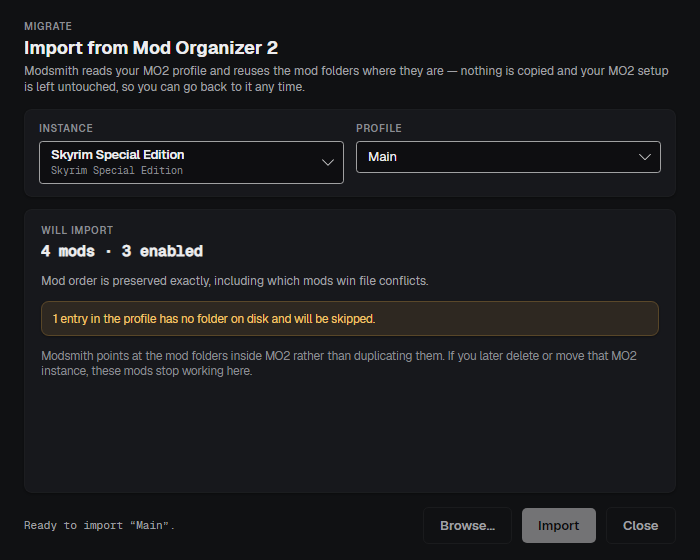
    A collection is a file that lists mods by their Nexus ids, never the mods themselves. Importing from Mod Organizer 2 reads your instance and leaves it alone.
    Collections
    Export the current build as a collection file with mod, file, size and hash for each entry. Whoever opens it downloads through their own Nexus account; the file contains no keys and no local paths.
    Import checklist
    Opening a collection shows what is already installed and what is left to fetch, with a button to each mod page. Progress is derived from the library, so it is always right.
    Mod Organizer 2 import
    Discovers portable and global instances, reads the profile's mod list and order, registers mods by reference to the MO2 folders, and turns separators into group captions. The instance is not modified.
    The Mod Organizer 2 import window: a detected instance, its profiles, and the count of mods that will be registered.

    Health

    Know what runs, know what broke.

    Crash logs, native files and runtime versions are the three things that break a build without warning. Each has a surface.
    Crash analysis
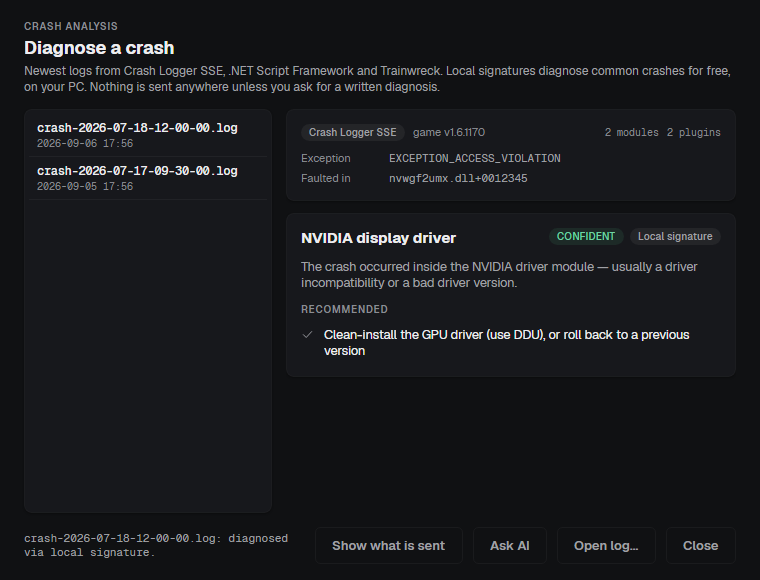
    Finds logs from Crash Logger SSE, Trainwreck and .NET Script Framework, parses the exception, the faulting module, the call stack and the loaded plugins, and matches them against local signatures for the usual suspects. Smith takes over from there.
    Quarantine
    DLL and EXE files inside a mod that the app does not recognise are held back until you decide, hashed and listed. Restore puts a file back into its mod; delete asks first, because there is no other copy.
    Runtime compatibility
    Names your game runtime, the matching Address Library branch and the mods carrying script-extender plugins, so a downgrade or an upgrade is a decision rather than a guess. The app never patches the game executable.
    Game settings
    Edit the settings that matter, field of view, borderless window, VSync, text language, from a form with a caveat on each. Only what you changed is written, and every write keeps a backup.
    The crash analysis window: a list of crash logs, the parsed exception and faulting module, and a local signature naming the display driver with a recommended action.

    Everyday

    The small things you use every day.

    Command palette

    Ctrl K runs any command or jumps to any mod. Entries for capabilities the current game lacks are simply absent.

    Themes and density

    Dark, Midnight and Light themes; comfortable and compact lists. Panel widths, hidden sidebar rows and window geometry survive restarts.

    Notes and search

    A note on any mod, and a search that matches names, authors, plugin names and notes.

    Updates

    The app checks its own update feed at start and when you ask, downloads in the background and restarts only after you confirm, and never while files are being written.

    Uninstall

    Uninstalling removes the app, restores the save-path setting it changed and leaves a note in the data folder listing anything still deployed and how to undo it.

    Add a game

    The app ships one game engine. Another game can be added by pointing at its folder: the app will place mod files where you say and can undo it, but it cannot tell whether that game loads them.

    Coming from Mod Organizer 2

    The same ideas, a few different words.

    If you have used Mod Organizer 2, nothing here will surprise you. The main difference is under the hood: Modsmith places real links in the game folder instead of a virtual file system, which is why external tools need no special launcher and why everything can be undone.

    In Mod Organizer 2In ModsmithWhat is different
    InstanceLibrary and gameOne library per game; profiles inside it.
    Virtual file systemDeployHardlinks in the real folder, journaled and reversible. Tools see the real folder without a hook.
    PriorityMod orderLower in the list wins, like MO2. Dragging works the same way.
    Overwrite folderLeft in game folderFiles a tool creates are found after it exits and taken into a mod of their own.
    SeparatorsGroup captionsImported as they are.
    Sort (LOOT)Sort load orderSame masterlist. Here the sort is a suggestion: undo it, or reset the plugins to follow the mod order.
    Profiles with local savesProfiles with isolated savesSame idea; the INI change is backed up and restored on uninstall.
    Nexus download handlernxm linksSame handshake with the Nexus site. The app asks before taking the association from another manager.
    ImportImport a setup from MO2Reads the instance by reference; nothing is copied or changed.

    Try it on a build you can afford to break.

    Then on the one you cannot. Roll back is there for both.